
How to Get Rerolls in Gakusen: Promo Codes and How to Redeem Them
Redeeming promo codes is a supported way to get Rerolls in Gakusen. Follow the four redemption steps, see what codes give, how to confirm success, and where to find new working codes.
Quick answer
Redeem promo codes — a game-supported way to get Rerolls in Gakusen. Codes are redeemed from the Settings menu while you are loaded into a server, and the Rerolls are credited straight to your account.
- Codes like DISCORD and UPDATE were listed as active in November 2026; the Gakusen codes page keeps the current working list.
- Codes have given 15 or 30 Rerolls, and no level, group or gamepass requirement has been noted for redeeming them.
- Every code can be redeemed once, codes are case sensitive, and codes can expire at any time.
Grab a fresh code from the Gakusen codes page — it keeps the current working list together with what each code credits — then follow the redemption steps below.
How to redeem a code in Gakusen
The code box is part of the in-game Settings menu, so you need to be loaded into a server before you can redeem anything:
- Launch Gakusen and join a server.
- Click the Settings button at the top left of the screen.
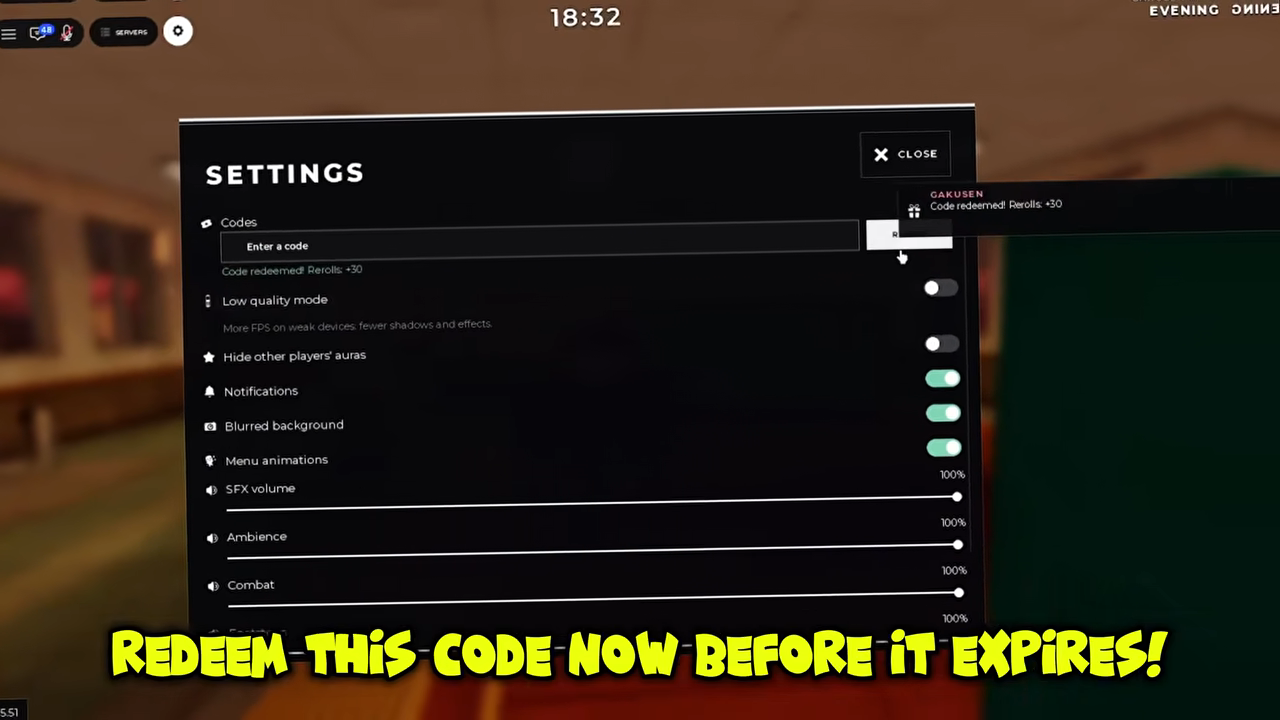
- Type your code into the "Enter a code" box in the Codes section of the Settings menu. The field carries a helper note that each code can be redeemed once, so use a code you have not redeemed before.
- Click REDEEM, and the code's Rerolls are credited to your account.
Type codes exactly as shown: Gakusen codes are case sensitive, so the redemption box treats DISCORD and discord as different entries.
What Gakusen codes give you
Every Gakusen code credits Rerolls, with the amount depending on the code — the codes released so far have given either 15 or 30 Rerolls. Nothing else gates redemption: no level threshold, no Roblox group membership and no gamepass purchase has been noted as a requirement, so any player who has loaded into a server can open Settings and redeem.
How to tell a code worked
A successful redemption confirms itself in two places at once. Under the code field, a message such as "Code redeemed! Rerolls +30" appears — that exact wording was seen when the UPDATE code was redeemed — and a matching GAKUSEN toast pops up in the top-right corner of the screen. Seeing both means the Rerolls are already on your account. If neither appears, the code was not accepted, and the usual culprits are below.
If a code doesn't work
Tips
Check the capitalization
Gakusen codes are case sensitive, so retype the code exactly as shown instead of typing it in lowercase.
Use a code you have not redeemed before
Each code can be redeemed only once — the helper text under the field says so — and a code that has already been redeemed cannot be redeemed again.
Switch to a fresher code
Codes can expire at any time, so if one stops working, pick up the newest working code from the Gakusen codes page instead.
Where to find new Gakusen codes
New codes can be found by watching the developer's Roblox group and the official Discord server, where the developer posts fresh codes and update notes. Gakusen itself is made by one person through the Roblox group Gakusen, so both spots are worth a periodic look if you want codes the moment they land. If you would rather skip the hunting, the Gakusen codes page is refreshed whenever new working codes appear, making it the easiest place to check what is currently redeemable.